Main section
Update: Client Authentication in TLS/SSL Certificates will no longer be supported by 2027 - What you need to do now
As of 15 March 2027, the use case "Client Authentication" may no longer be included in public TLS/SSL certificates, otherwise they would no longer be considered trustworthy by Google Chrome. Check in good time whether and to what extent you are using TLS/SSL certificates in this way, and what alternatives are available for your encryption - background and recommendations from SwissSign.
The Google Chrome team has decided to no longer accept the "Client Authentication" purpose in the Extended Key Usage (EKU) of SSL/TLS server certificates as of June 15, 2026 (see Google Chrome Root Program Policy, v1.8) - only "Server Authentication" will be allowed in the future. Google Chrome aims to enforce a clean separation of applications for server and client authentication.
Google had initially announced a deadline of mid-June 2026. This has now been postponed. The latest policy sets out two consecutive deadlines:
-
15 June 2026: New intermediate/sub-certification authorities (Intermediate/Sub-CAs) published in the CCADB after this date may only contain the EKU id-kp-serverAuth.
-
15 March 2027: All newly issued public TLS subscriber certificates (i.e. the certificates you obtain as a customer) must contain only the EKU id-kp-serverAuth.
Implementation of SwissSign certificates in the first quarter of 2027
For public TLS certificates, i.e. certificates used on the internet, SwissSign will of course implement this requirement. Following Google’s deadline extension, we have revised our schedule. The new certificate profiles, which will in future contain only the intended usage “Server Authentication”, are expected to be available at the end of September 2026. The existing certificate profiles with clientAuth and serverAuth are expected to be replaced at the end of January 2027.
We will communicate the exact date as soon as possible in our blog and via the RSS feed "Service Status". These certificates can then only be used for the server side of a TLS connection.
Those not affected
As a SwissSign customer, you probably only use your TLS certificates from SwissSign for the intended purpose, i.e. for SSL/TLS server authentication on the Internet. In this case, the change does not affect you, everything will continue to work as usual.
What exactly is changing?
-
New ICA and leaf policies will in future contain only “Server Authentication”.
-
New MPKI certificate profiles are expected to be available from the end of September 2026.
-
The existing policies with clientAuth and serverAuth will be replaced at the end of January 2027.
-
New publicly trusted TLS/SSL certificates can then no longer be used for Client Authentication.
New certificate profiles from September 2026
The overview below shows the existing MPKI certificate profiles and their new names. Going forward, the new profiles will exclusively include the Server Authentication (serverAuth) key usage.
Current product name |
New product name |
|---|---|
| SwissSign DV SSL Silver Single-Domain | SwissSign TLS DV Single-Domain |
| SwissSign DV SSL Silver Wildcard |
SwissSign TLS DV Wildcard |
| SwissSign DV SSL Silver Multi-Domain | SwissSign TLS DV Multi-Domain |
|
SwissSign OV SSL Gold Single-Domain |
SwissSign TLS OV Single-Domain |
| SwissSign OV SSL Gold Multi-Domain |
SwissSign TLS OV Multi-Domain |
|
SwissSign OV SSL Gold Multi-Domain Wildcard |
SwissSign TLS OV Multi-Domain Wildcard |
|
SwissSign OV SSL Gold Wildcard |
SwissSign TLS OV Wildcard |
|
SwissSign EV SSL Gold Single-Domain |
SwissSign TLS EV Single-Domain |
| SwissSign EV SSL Gold Multi-Domain |
SwissSign TLS EV Multi-Domain |
Our recommendation: Scan, inventory, automate and replace
1. Inventory of your certificates
If you are unsure whether public TLS server certificates are used as client certificates in your company, we recommend that you conduct an early inventory and analysis.
If you are unsure whether public SSL/TLS server certificates are used as client certificates in your company, we recommend that you take stock of the situation at an early stage. Following the reduction of SSL/TLS certificate validity periods to 47 days, we strongly recommend that you (details in our blog post).
In German-speaking countries, 90% of our certificate customers manage their certificates at least partially manually and need several hours to replace each individual certificate. If this has to be done every two months instead of once a year in future, manual processes will no longer be viable. A certificate lifecycle management (CLM) solution fully automates inventory, renewal and distribution – helping you to overcome both challenges at the same time.
2. Replace affected public certificates with private certificates
If your analysis shows that some of the certificates are used for client authentication, we recommend using private certificates for these that are not intended for use on the Internet. Such private certificates can be issued as part of a dedicated private managed PKI provided by SwissSign.
3. Alternative: S/MIME certificates for authentication purposes
Alternatively, you can also use Sponsor-Validated S/MIME certificates for client authentication. This product is available in every SwissSign Managed PKI from the OV (Organisation Validation) level.
Do you need help with the transition to the new certificates?
Would you like to understand how you can redesign your certificate management for the coming years?
Schedule a call with our expertsEKU and Client Authentication: Technical Background
"mutual TLS": If the client authentication is part of an SSL/TLS connection
An SSL/TLS connection is established from a client (for example, a browser) to a server (for example, a web server). A "handshake" is performed for the connection setup. SSL/TLS has the purpose of:
-
Connection encryption
-
Authentication of the server
-
Optional: Client authentication
For the authentication of the server, the mentioned server certificates are used. If client authentication is performed and client certificates are used, we speak of "mutual TLS".
The TLS connection setup, the "handshake," is graphically represented below for the two TLS versions 1.2 and 1.3.
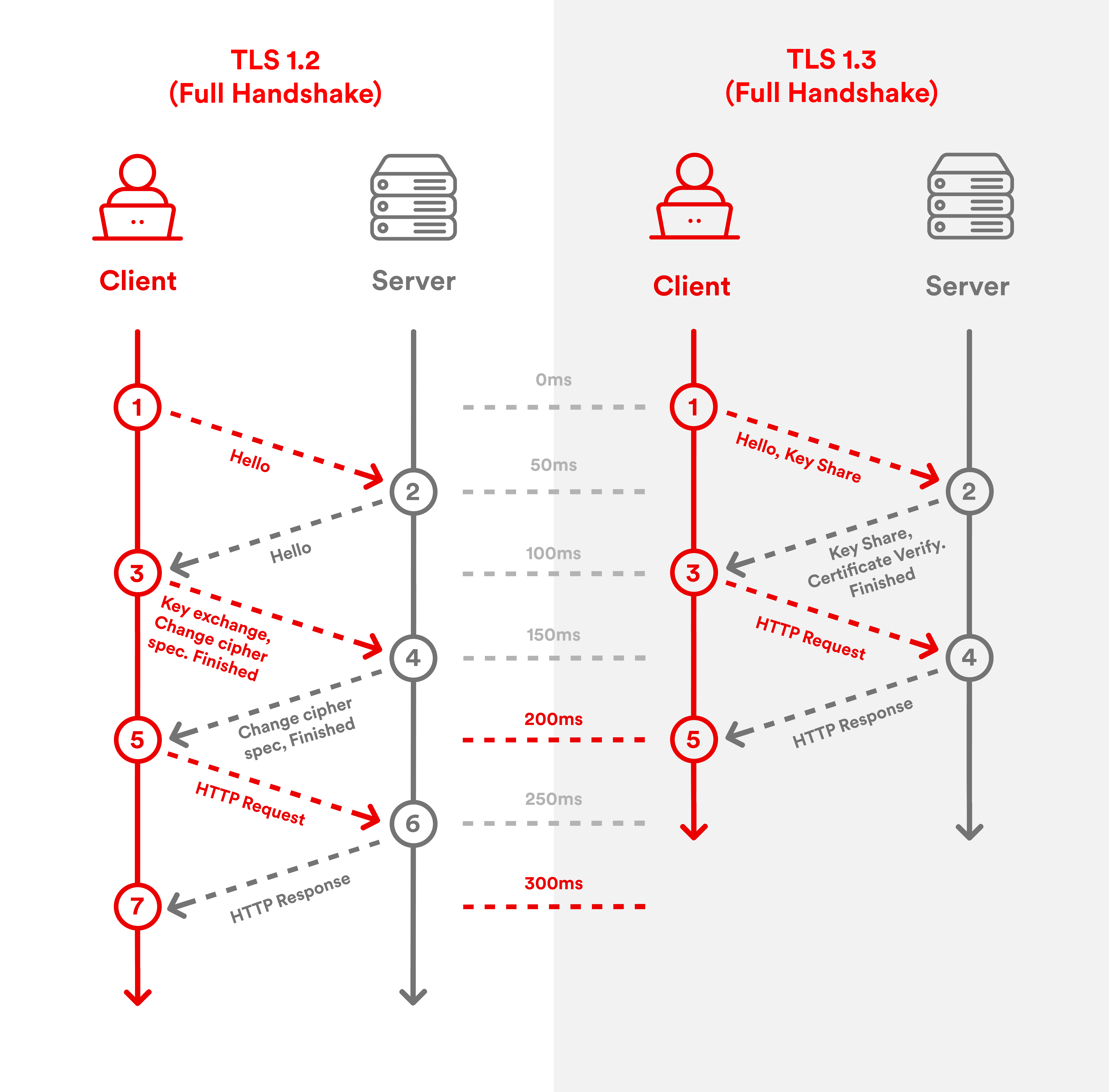
For further explanations about the latest TLS version 1.3 and its benefits, please read the blog post "What is TLS 1.3 - and what are the benefits compared to TLS 1.2?"
Extended Key Usage: Server and client authentication
In public key certificates, the intended use is recorded in a special certificate field (a "certificate extension"). This is the extension called "Extended Key Usage" (EKU). Up to now, this has been pupulated in public SSL/TLS certificates as follows:
-
TLS WWW server authentication (OID: 1.3.6.1.5.5.7.3.1)
-
TLS WWW client authentication (OID: 1.3.6.1.5.5.7.3.2)
The first entry (TLS-WWW-Server Authentication) will continue to be included, the second (TLS-WWW-Client Authentication) will be removed.
Frequently asked questions (FAQ)
Google Chrome will no longer trust public-trusted TLS/SSL certificates that contain the Client Authentication Extended Key Usage (EKU). From 15 March 2027, newly issued public TLS certificates must contain only the Server Authentication EKU.
Google wants a clear separation between certificates used for:
-
Server authentication (websites and internet-facing services)
-
Client authentication (users, devices, or systems authenticating to servers)
In the future, public TLS certificates should only be used to authenticate servers.
SwissSign introduces new public-trusted TLS policies with Server Authentication only. Customers and partners are expected to migrate to the new policies until the existing policies with Client Authentication are going to retire in January 2027.
Three important dates apply:
-
28 September 2026: Introduction of new public-trusted TLS policies with Server Authentication only.
-
January 2027: Retiring public-trusted TLS policies with Client Authentication. New public-trusted certificates issued by SwissSign are going to have Server Authentication only.
-
15 March 2027: All newly issued public-trusted TLS certificates must contain only Server Authentication.
If you use your TLS/SSL certificates only for securing websites, APIs, load balancers, reverse proxies, or other internet-facing services, you are most likely not affected.
You may be affected if you use public TLS certificates for:
- Mutual TLS (mTLS)
- Client authentication between applications
- Device authentication
- User authentication
- Machine-to-machine authentication
Perform a certificate inventory and identify:
- Public TLS certificates currently in use.
- Certificates used for client authentication.
- Systems implementing mTLS.
- Applications that require client certificates.
Organizations should start this assessment well before March 2027.
-
After the date of retirement of existing policies of SwissSign, you will not be able to issue any certificate with Client Authentication. The existing certificates with Client Authentication are going to be valid until they expire.
-
After the enforcement date, public TLS certificates including Client Authentication may no longer be trusted by Google Chrome and ecosystems aligned with Chrome’s root program requirements. This could cause authentication failures in affected environments.
SwissSign recommends:
-
Create inventory of your certificates.
-
Identify client authentication use cases.
-
Replace affected public certificates with appropriate alternatives.
-
Introduce lifecycle automation where possible.
-
Migrate to new policies for public-trusted TLS certificates.
For internal authentication scenarios, SwissSign recommends using private certificates issued through a managed private PKI rather than publicly trusted TLS certificates.
Yes. Sponsor-Validated S/MIME certificates can be used as an alternative for client authentication and are available from SwissSign.
If you manage many certificates, CLM can help automate:
- Discovery and inventory
- Renewals
- Deployment
- Compliance reporting
- Certificate replacement projects
This becomes particularly valuable as certificate validity periods decrease and migration efforts increase.